



























Sunsama: What It Is, Features, Pricing, and Best Alternatives
Introduction
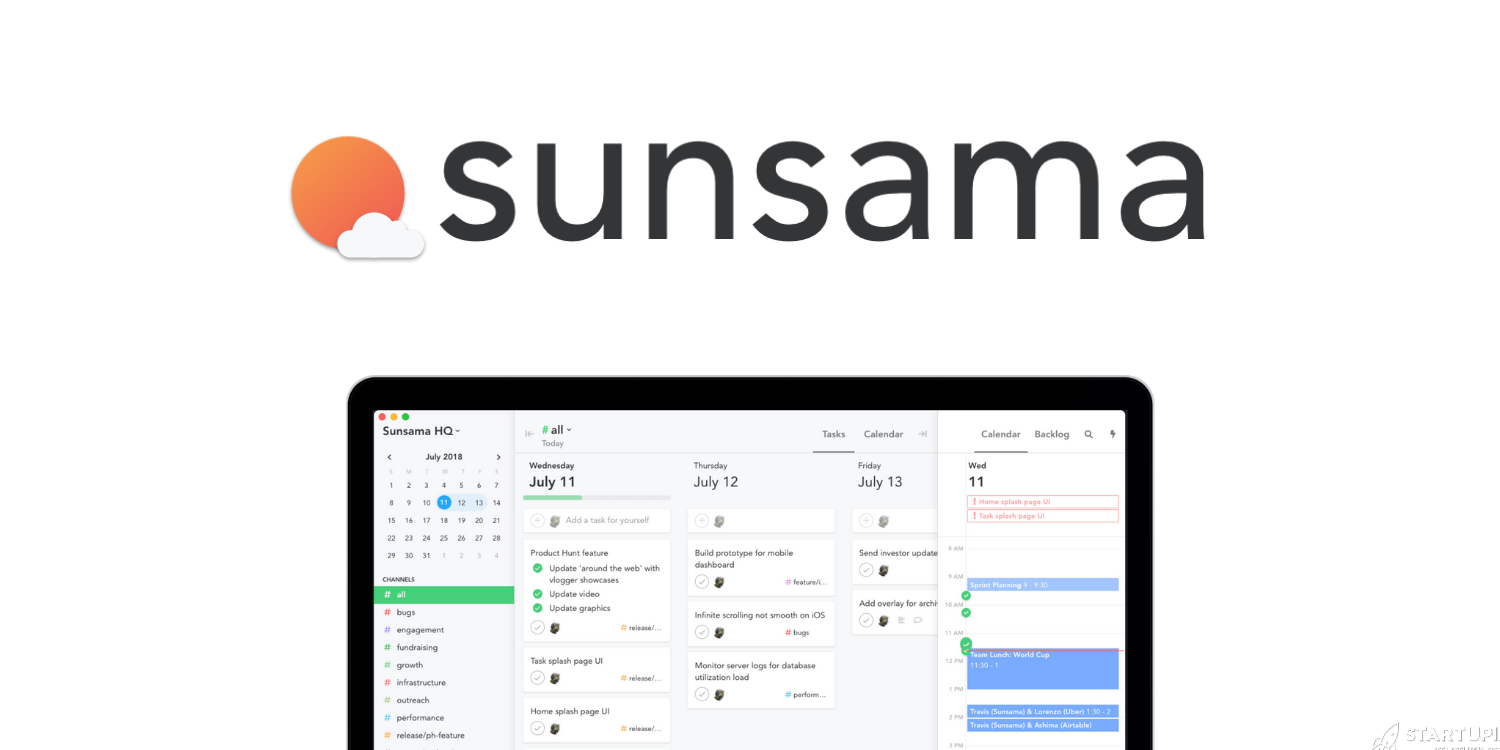
Sunsama is a daily planning and time-blocking tool that combines your calendar and tasks into a single focused view. Instead of being another project management platform, Sunsama is designed as a calm, structured workspace where founders and teams deliberately plan each day.
Startups use Sunsama because it helps combat the chaos of scattered tools: Slack pings, Jira tickets, Notion docs, email, and meetings all competing for attention. Sunsama pulls work from these sources into a realistic daily agenda so you can make better decisions about what actually gets done.
What Sunsama Does
The core purpose of Sunsama is to help knowledge workers, especially founders and operators, plan each day with intention. It sits on top of your existing tools, not as a replacement but as an orchestration layer.
In practice, Sunsama does three main things:
- Consolidates tasks and meetings from tools like Gmail, Outlook, Asana, Trello, Jira, Notion, and Slack into one place.
- Encourages daily time blocking, assigning realistic time estimates and calendar slots to the work you choose for the day.
- Guides you through a planning and shutdown ritual to prevent overcommitting, reduce stress, and maintain consistent progress.
Key Features
Daily Planning Ritual
- Structured workflow to review upcoming tasks, emails, and meetings.
- Drag tasks into “Today” and assign time estimates.
- Gentle prompts to avoid overloading your day based on total planned hours.
- End-of-day “shutdown” to review what got done and roll over remaining tasks.
Time Blocking with Calendar Integration
- Two-way sync with Google Calendar, Outlook, and other major calendars.
- Drag tasks directly onto your calendar as time blocks.
- Visual daily and weekly views to balance meetings and deep work.
- Support for multiple calendars (work, personal, shared) in one interface.
Task Aggregation and Integrations
- Import tasks and issues from tools like:
- Asana, Trello, ClickUp, Jira
- Notion databases and pages
- GitHub issues and pull requests
- Gmail/Outlook emails (turn emails into tasks)
- Slack messages (capture follow-ups)
- Unified inbox of potential work; you cherry-pick what deserves time today.
- Tasks remain linked to their source so you can jump back when needed.
Focus and Flow Support
- “Today” view keeps your active tasks and calendar front and center.
- Focus timers and session tracking for deep work blocks.
- Optional reminders and nudges without being overwhelming.
- Lightweight analytics on time spent by category or project.
Light Team Collaboration
- Shared channels and workspaces for small teams.
- Ability to see what teammates plan to work on today (if shared).
- Not a full project management system, but adds transparency to daily focus.
Cross-Platform Availability
- Web app accessible from modern browsers.
- Desktop apps for macOS and Windows.
- Mobile support via web or native apps (depending on platform).
Use Cases for Startups
Sunsama fits especially well in small, fast-moving teams where roles are fluid and everyone juggles multiple contexts.
- Founders and CEOs
- Balance investor meetings, hiring, product reviews, and deep strategy work.
- Create a structured “maker/manager” schedule to protect focus time.
- Product and Engineering Leaders
- Pull issues from Jira, GitHub, or Linear into a realistic daily plan.
- Time-block code, design, and spec-writing around recurring meetings.
- Early-Stage Operators (Ops, Growth, Marketing)
- Combine campaign tasks, analytics deep dives, and partner calls in one view.
- Use weekly review to ensure strategic work doesn’t get buried under urgent tasks.
- Remote and Distributed Teams
- Give teammates visibility into each other’s daily priorities without micromanagement.
- Support flexible schedules while maintaining alignment on focus areas.
- Individual Contributors in High-Context Roles
- Customer success, sales, and support can plan follow-ups around calls.
- Reduce cognitive load by committing to a small set of tasks each day.
Pricing
Pricing details can change, but as of late 2024 Sunsama uses a straightforward subscription model.
| Plan | Type | Approx. Price (per user) | Includes |
|---|---|---|---|
| Free Trial | Trial | $0 for ~14 days | Access to full feature set for a limited time. No credit card sometimes required at signup, depending on promotions. |
| Standard | Paid | ~$20–$25/month (lower with annual billing) | All core features: unlimited planning, integrations, time tracking, and team workspaces. |
Key points:
- No permanent free tier for long-term use; after the trial, you must subscribe.
- Discounts are sometimes available for students, non-profits, and longer commitments.
- Billing is typically per user, making it most cost-effective for individuals and small teams that will actively use it.
For current and exact pricing, founders should check Sunsama’s official site or contact sales for team plans.
Pros and Cons
Pros
- Excellent daily planning experience: One of the most polished interfaces for intentional daily and weekly time blocking.
- Integrates with existing tools: Sits on top of tools like Jira, Notion, and Asana instead of forcing migration.
- Calm, non-overwhelming design: Built to reduce stress rather than add more complexity.
- Great for founders and high-autonomy roles: Helps balance strategic and operational work.
- Rituals encourage sustainable work habits: Planning and shutdown flows support long-term productivity and prevent burnout.
Cons
- No true free plan: Ongoing subscription cost can be a barrier for very early-stage teams and bootstrappers.
- Not a full project management system: You still need separate tools (e.g., Jira, Asana) for collaboration, roadmaps, and backlog management.
- Limited value if your team doesn’t adopt it: Works best when at least key individuals use it consistently.
- Learning curve for non–time-blockers: If your team is not used to time-blocking, adoption may require habit changes.
- Less automation than some competitors: Tools like Motion auto-schedule tasks; Sunsama is more manual but deliberate.
Alternatives
If Sunsama’s pricing or approach is not a perfect fit, there are several alternatives that address similar needs.
| Tool | Best For | Key Difference vs. Sunsama | Typical Pricing |
|---|---|---|---|
| Motion | Founders and teams who want AI to auto-schedule work | Automatically rearranges tasks on your calendar using AI; more opinionated and automation-heavy. | Higher; usually per-user SaaS pricing with no free tier. |
| Akiflow | Power users who want fast task capture and command-palette workflows | Similar task aggregation but more keyboard-centric and GTD-style; slightly less ritualized than Sunsama. | Comparable to Sunsama; subscription-based. |
| Todoist | Individuals wanting a robust task manager with light scheduling | Great for task lists and projects; weak on calendar time-blocking compared with Sunsama. | Free tier plus affordable premium plans. |
| Notion (with calendar integrations) | Teams that centralize docs, wikis, and tasks in one workspace | Very flexible and all-in-one; requires more setup and lacks Sunsama’s guided daily ritual. | Free tier; paid tiers for teams and advanced features. |
| ClickUp or Asana | Teams needing full project and task management | Better for collaboration and project tracking; weaker at personal daily planning and calm time-blocking. | Free tiers plus per-user paid plans. |
| Morgen / Routine / Marvin | Individuals experimenting with calendar-first productivity | Each focuses on slightly different flavors of calendar + tasks; varying levels of automation and structure. | Mix of free and paid tiers; typically cheaper than Sunsama. |
When choosing among these, consider:
- Do you want automation (Motion) or intentional manual planning (Sunsama)?
- Do you need team project management (Asana, ClickUp) or a personal planning companion (Sunsama, Akiflow)?
- Is a free tier a requirement at your current stage?
Who Should Use It
Sunsama is not for everyone, but it is extremely effective for certain startup profiles.
Best suited for:
- Seed to Series B startups where leaders juggle many responsibilities.
- Founders, COOs, PMs, and tech leads who already rely on multiple tools (Jira, Notion, Slack, email) and need a unifying layer.
- Teams that value intentional work, deep focus time, and sustainable pacing over “always-on” hustle.
- Remote or hybrid teams that want light transparency into daily priorities without heavyweight process.
Less suited for:
- Pre-revenue teams with extremely tight budgets who cannot justify another subscription.
- Startups that want a single tool to replace Jira/Asana/Notion; Sunsama is complementary, not a replacement.
- Teams that resist time-blocking or structured planning and prefer ad-hoc task lists.
Key Takeaways
- Sunsama is a daily planning and time-blocking hub that sits on top of your existing tools to create a realistic, focused agenda.
- It excels at intentional planning rituals, calm design, and integrations, making it well-suited for founders and startup operators.
- The tool is not a full project management platform; you will likely still need Asana, Jira, or Notion.
- Pricing is premium with no long-term free tier, so it’s best for individuals and teams who will use it daily.
- Alternatives like Motion, Akiflow, Notion, and ClickUp may be better if you prefer automation, full project management, or a freemium model.
- For startups that can afford it and embrace time-blocking, Sunsama can significantly improve daily focus, reduce overwhelm, and make work more sustainable.




